Sunlit › Guides
See the sun path in AR on your iPhone
Hold the phone up and the track of the sun lands on the live camera image, hour by hour, with the solstice and equinox paths behind it. In August you can see where the light will fall in December.

Free to install. iPhone with iOS 17 or later. Today at your current location is free forever in all four views, and Sunlit Pro is one payment of 9.99 EUR that opens every other date and place.
What an AR sun path actually shows you
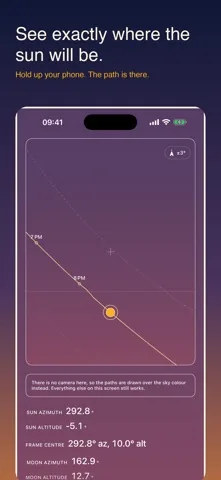
Hold the phone up and Sunlit draws the track the sun takes across the sky on top of the live camera image, with a tick at every whole local hour along it. The moon path runs beside it. Behind both sit three reference curves: the summer solstice, the winter solstice and the equinox. That is the part that answers the question people actually have. In August you can stand in a room and see where the light will fall in December.
The solstice and equinox curves are drawn for the nominal calendar dates rather than the solved instants, and they are labelled that way. The difference at the solstice is under a hundredth of a degree of solar declination, which is invisible at the scale of a curve on a phone screen.
The compass is the hard part, and the app says so
Every AR sun app lives or dies on the heading, and the heading comes from a magnetometer measuring a weak field. Anything magnetic nearby competes with it: a MagSafe charger, a case or wallet with magnets in it, a car dashboard, a tripod head, a loudspeaker, steel in a wall, a metal desk. This is a property of the hardware, not of any one app, and it is the single most common complaint about the whole category.
Sunlit takes heading from device attitude in the true north reference frame rather than from a raw magnetic reading, with magnetic declination from a model carried inside the app. More usefully, it shows you how sure it is: a chip in the corner gives the current heading uncertainty in degrees at all times, and it turns amber when iOS reports that the compass needs calibrating. A direction printed without an uncertainty is a guess wearing a confident face.
To calibrate a wandering compass
- Step away from metal and from anything magnetic, and take the phone out of a magnetic case.
- Move it slowly in a figure of eight, turning your wrist as you go, for a few seconds.
- Watch the figure on the chip. It should drop. If it does not, you are still standing next to something the magnetometer can feel.
If you refuse the camera
iOS asks for the camera the first time you open the AR view, because the view draws over the live image. If you say no, the view still opens. The paths are drawn over the sky colour instead, and everything else on the screen keeps working. You can change your mind later in the iPhone Settings app, under Sunlit, by switching Camera on.
The Milky Way in AR
Once the selected instant is astronomically dark, meaning the sun is more than 18 degrees below the horizon, the galactic plane joins the sun and moon paths on the overlay, with the galactic centre marked on it. It is deliberately not drawn over a blue sky, because a band of the Milky Way painted across daylight is a promise the sky is not going to keep. The Milky Way planner guide goes through the three conditions that have to line up.
What is free
The AR sun path for today, at the place you are standing, is free forever, together with the heading uncertainty chip and the sun readouts. The moon path, the solstice and equinox reference curves, the galactic plane and the measured horizon sweep are part of Sunlit Pro, one payment of 9.99 EUR with nothing renewing.
Point it at the sky and watch the path land on it.
The AR sun path for today at your location is free, and the app tells you how sure the compass is.
More guides